> For the complete documentation index, see [llms.txt](https://docs.livlive.com/llms.txt). Markdown versions of documentation pages are available by appending `.md` to page URLs; this page is available as [Markdown](https://docs.livlive.com/how-to-buy/pay-with-card.md).

# Pay with Card

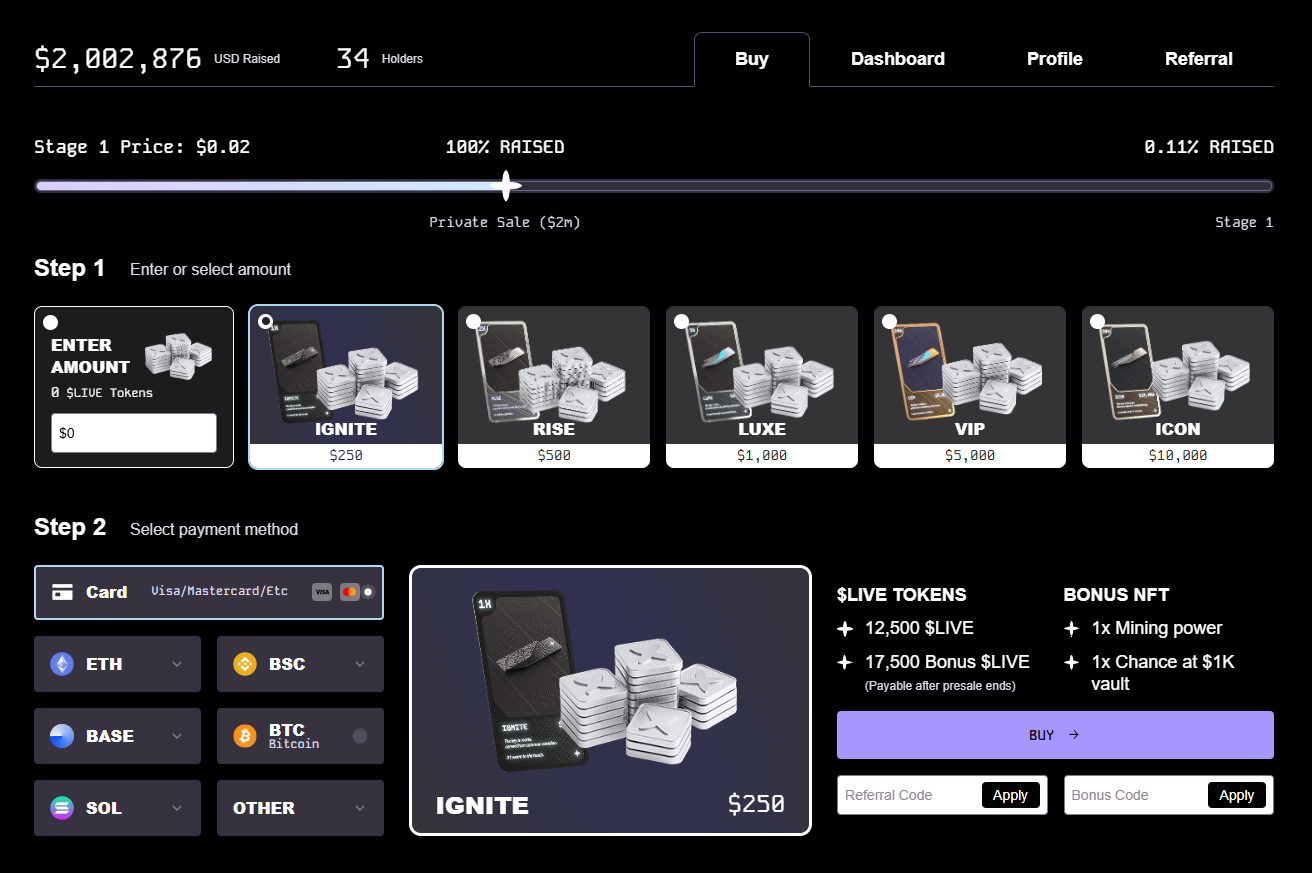
You can participate in the LivLive Presale using your Debit/Credit Cards using the following steps:

Step 1: Enter either a Custom Purchase Amount or select Presale Token and NFT pack.

<figure><img src="https://3979050964-files.gitbook.io/~/files/v0/b/gitbook-x-prod.appspot.com/o/spaces%2FG1KaYnUHjH4uZs8TfXaz%2Fuploads%2FKP5m7tvWwMetisGh2Kxf%2Fimage.png?alt=media&amp;token=98862f24-2014-4715-91f3-f515cd4b74f7" alt=""><figcaption></figcaption></figure>

Step 2: Select Card Payment Option.

<figure><img src="https://3979050964-files.gitbook.io/~/files/v0/b/gitbook-x-prod.appspot.com/o/spaces%2FG1KaYnUHjH4uZs8TfXaz%2Fuploads%2Fg5Q9ZcRzHWXFPYB0yuQu%2Fimage.png?alt=media&amp;token=d5d622b2-d42c-4bfe-8317-16bfeb591faf" alt=""><figcaption></figcaption></figure>

Step 3: Connect Wallet and press the connect or confirm button in your Wallet.

<figure><img src="https://3979050964-files.gitbook.io/~/files/v0/b/gitbook-x-prod.appspot.com/o/spaces%2FG1KaYnUHjH4uZs8TfXaz%2Fuploads%2FZD2fbBWAMcFmmJTAd2iA%2FWhatsApp%20Image%202025-09-21%20at%2008.26.35.jpeg?alt=media&amp;token=37126892-642a-41f1-8638-8f478e7d4ead" alt=""><figcaption></figcaption></figure>

Step 4: Once your wallet is connected, press the BUY button.

<figure><img src="https://3979050964-files.gitbook.io/~/files/v0/b/gitbook-x-prod.appspot.com/o/spaces%2FG1KaYnUHjH4uZs8TfXaz%2Fuploads%2FnJj8iwJpfltG3nuFiNBx%2Fimage.png?alt=media&amp;token=20bf41cb-d9b8-4345-8d42-c1d54764a190" alt=""><figcaption></figcaption></figure>

Step 5: Follow the prompts to register your Details and enter your card.

<figure><img src="https://3979050964-files.gitbook.io/~/files/v0/b/gitbook-x-prod.appspot.com/o/spaces%2FG1KaYnUHjH4uZs8TfXaz%2Fuploads%2FgkTJbG6GQitVuJYmhyJ0%2Fimage.png?alt=media&amp;token=330b476a-dca0-4e83-bad4-e00b2f18d8fd" alt="" width="375"><figcaption></figcaption></figure>

Step 6: Choose to pay with Card or Google Pay

<figure><img src="https://3979050964-files.gitbook.io/~/files/v0/b/gitbook-x-prod.appspot.com/o/spaces%2FG1KaYnUHjH4uZs8TfXaz%2Fuploads%2FVINYj9mZwvyztT368yxj%2Fimage.png?alt=media&amp;token=338900f7-a365-4872-badc-711caa566c66" alt="" width="375"><figcaption></figcaption></figure>

Step 7: Once payment is completed, the transaction will be broadcast to the blockchain

<figure><img src="https://3979050964-files.gitbook.io/~/files/v0/b/gitbook-x-prod.appspot.com/o/spaces%2FG1KaYnUHjH4uZs8TfXaz%2Fuploads%2FS7mrS9j44UBu5MfkeNJK%2Fimage.png?alt=media&amp;token=20e03188-ddfd-46e6-886c-e26e469ec5e9" alt="" width="375"><figcaption></figcaption></figure>

You will see a Transaction Successful Prompt and you can see your Purchase in the Dashboard Tab at anytime when you connect your wallet.

<figure><img src="https://3979050964-files.gitbook.io/~/files/v0/b/gitbook-x-prod.appspot.com/o/spaces%2FG1KaYnUHjH4uZs8TfXaz%2Fuploads%2FfxpVA9awQHTk1Qjp2C0F%2Fimage.png?alt=media&amp;token=9a773a90-aca7-45a8-8c5d-be5227d58491" alt=""><figcaption></figcaption></figure>

Once your transaction is finalized don't forget to add your Contact details to get the most out of your LivLive journey:

<figure><img src="https://3979050964-files.gitbook.io/~/files/v0/b/gitbook-x-prod.appspot.com/o/spaces%2FG1KaYnUHjH4uZs8TfXaz%2Fuploads%2Fd8gbu9WdHyaoUJyZVz4e%2FScreenshot%202025-10-01%20at%205.34.27%E2%80%AFPM.png?alt=media&amp;token=5b787c3c-9ad5-4a73-bc3c-86c8fbe4aa3e" alt="" width="188"><figcaption></figcaption></figure>